

The Ultimate Lost AirPods Finder Guide: Never Lose Your Buds Again!
Have you ever experienced that sinking feeling? You reach for your AirPods, ready to immerse yourself in your favorite playlist or take an important call, and… they’re gone. Vanished. It’s a modern-day tragedy that, let’s be honest, many of us have faced. But don’t panic! Losing your AirPods isn’t necessarily a permanent loss. Apple has built-in features designed to help you track them down, and this comprehensive guide will walk you through everything you need to know to recover your precious earbuds – and even the charging case.
The popularity of wireless earbuds like AirPods has skyrocketed in recent years, becoming an essential part of our daily lives. Whether you’re a fitness enthusiast relying on them during workouts, a student needing focus during study sessions, or simply someone who enjoys music on the go, these tiny devices pack a powerful punch. But their small size also contributes to their tendency to go missing. Thankfully, Apple’s “Find My” ecosystem offers a lifeline. If you’re looking for the latest in tech, including other innovative gadgets, be sure to check out our Latest Gadgets 2025: The Tech Revolution Reshaping Our Lives.
Understanding How AirPods Tracking Works
The method for finding your lost AirPods depends heavily on which AirPods you own. Apple has steadily improved the tracking capabilities with each generation. Here’s a breakdown:
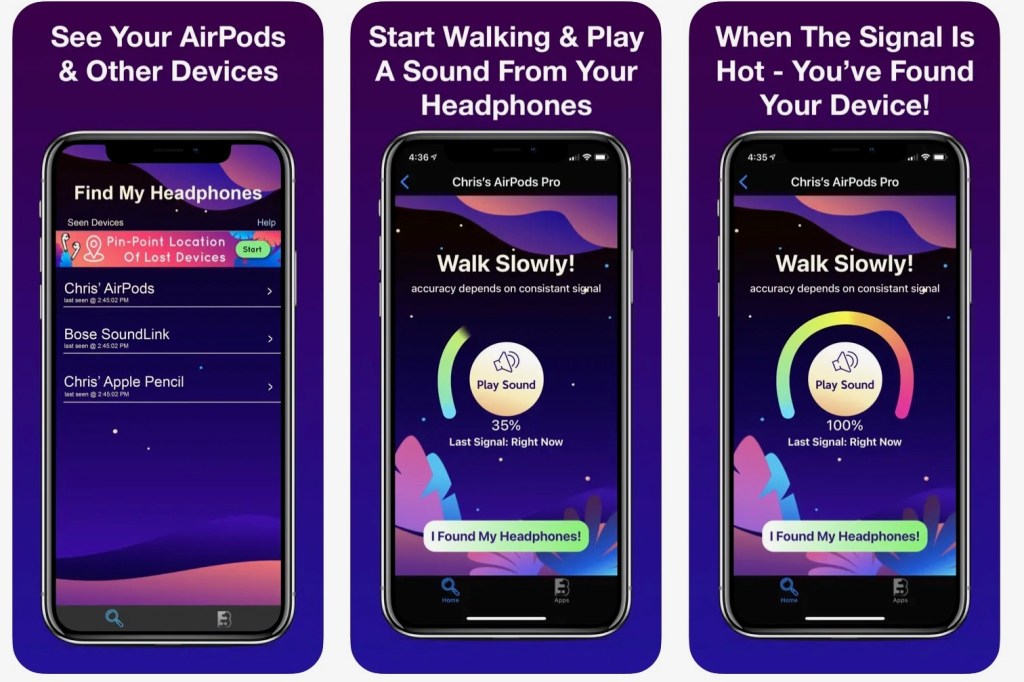
- AirPods (1st & 2nd Generation) & AirPods (3rd Generation): These models rely on Bluetooth proximity. The “Find My” app will show you the last known location of your AirPods on a map. This is where they were last connected to your iPhone, iPad, or Mac. If they’re currently within Bluetooth range, you’ll see a signal strength indicator, helping you pinpoint their location.
- AirPods Pro (2nd Generation): This is where things get seriously impressive. The latest AirPods Pro utilize Apple’s Ultra Wideband (UWB) technology, enabling Precision Finding. If you have an iPhone 11 or later, you can use Precision Finding to get turn-by-turn directions right to your AirPods. The app will guide you with an arrow, distance reading, and even haptic feedback as you get closer. https://www.macrumors.com/how-to/use-precision-finding-locate-airpods-pro-2/ This feature is a game-changer, transforming the hunt from a frustrating search to a guided recovery. For a broader look at the latest gadgets and tech winners of the year, see our Latest Gadgets 2025: Top Tech Winners You Need to Know About.
Step-by-Step: Finding Your Lost AirPods
Let’s dive into the practical steps you can take, starting with the easiest solutions:
- Play a Sound: This is your first line of defense, especially if you suspect your AirPods are nearby – perhaps slipped between couch cushions or under a car seat. Open the “Find My” app on your iPhone, iPad, or Mac. Select the “Devices” tab, and then tap on your AirPods from the list. If your AirPods are connected or recently connected, you’ll see an option to “Play Sound.” Tap it, and your AirPods will emit a chirping sound that gradually increases in volume. This sound also works for the charging case if at least one AirPod is inside. https://mashable.com/article/how-to-find-lost-airpods Keep in mind that if your AirPods are in a noisy environment, the sound might be difficult to hear.
- Check the Last Known Location: If playing a sound doesn’t work, the “Find My” app will display the last known location of your AirPods on a map. This is based on the last time they were connected to one of your Apple devices.
- Tap “Directions”: The app will provide directions to that location using Apple Maps.
- Consider the Context: Think about where you last used your AirPods. Were you at home, at the gym, in a coffee shop? This can help you narrow down the search area.
- Look Thoroughly: Even if the location seems obvious, meticulously search the area. AirPods are small and can easily be hidden.
- Utilize “Find Nearby” (for newer models): Available with iOS 13 and later, the “Find Nearby” feature can be helpful if you’ve misplaced your AirPods within your home or a familiar location. This feature leverages Bluetooth to actively search for your AirPods, even if they aren’t currently connected.
- Precision Finding (AirPods Pro 2nd Generation & iPhone 11 or later): As mentioned earlier, this is the most accurate method. In the “Find My” app, select your AirPods Pro (2nd generation). If they’re within range, the “Precision Finding” option will appear. Follow the on-screen instructions to navigate directly to your AirPods. The app will display the distance and direction, making the search incredibly efficient. https://www.macrumors.com/how-to/use-precision-finding-locate-airpods-pro-2/
What About the Lost Charging Case?
This is where things get trickier. Locating a lost AirPods case is significantly more challenging than finding the earbuds themselves. The “Find My” app can show the last known location of the case, but only if the case was separated from the AirPods while the AirPods were connected to a device.
Essentially, the case needs to have been “aware” of its location through the AirPods connection to register in the “Find My” app. If you lost the case independently, the app won’t be able to help.
- Tips for Finding a Lost Case:
- Retrace Your Steps: Think carefully about where you last had the case.
- Play a Sound (if possible): If the case was recently connected to AirPods inside, try playing a sound through the “Find My” app.
- Check Common Hiding Spots: Look in pockets, bags, under furniture, and anywhere else you might have accidentally left it.
Marking Your AirPods as Lost: A Last Resort
If you’ve exhausted all other options and believe your AirPods are truly lost, you can mark them as lost in the “Find My” app. This activates a few key features:
- Activation Lock: This prevents anyone else from pairing with and using your AirPods.
- Lost Mode Message: You can display a custom message on the device, along with your contact information. If someone finds your AirPods and tries to connect them, they’ll see your message and be able to contact you. https://support.apple.com/guide/airpods/find-your-airpods-dev8e8b93d71/web
- Notifications: You’ll receive notifications if your AirPods are located by the Find My network.
Preventing Future Losses: Proactive Measures
While the “Find My” app is a powerful tool, prevention is always better than cure. Here are a few tips to help you avoid losing your AirPods in the first place:
- Invest in a Protective Case: A case with a secure closure can prevent your AirPods from accidentally falling out. Consider cases with built-in tracking devices for an extra layer of security.
- Use a Lanyard or Clip: Attach a lanyard or clip to your AirPods case so you can keep it securely attached to your bag, keys, or wrist.
- Be Mindful of Your Surroundings: Pay attention to where you’re placing your AirPods, especially in public places.
- Enable “Left Behind” Notifications: The “Find My” app allows you to set up notifications that alert you if you leave your AirPods behind at a specific location. https://support.apple.com/guide/airpods/find-your-airpods-dev8e8b93d71/web
- Consider Alternatives: If you’re particularly prone to losing things, explore other wireless earbud options that come with more robust tracking features or even built-in tile trackers.
Beyond AirPods: Protecting Your Tech
Losing small, valuable gadgets is a common frustration. This isn’t limited to AirPods; it happens with smartwatches, portable Bluetooth speakers, and even TV remotes. The same principles apply: utilize tracking features when available, invest in protective accessories, and practice mindful placement.
For larger devices like laptops and tablets, consider enabling location tracking features within the operating system. And for your smartphone itself, a robust password or biometric authentication is crucial to prevent unauthorized access if it’s lost or stolen. If you’re concerned about keeping your laptop powered on the go, our Anker Laptop Power Bank Guide can help you find the best portable power solution. You can also stay up to date on Apple Stock (AAPL) performance and future forecasts with our Apple Stock (AAPL) in 2025: Performance Review & Future Forecasts.
Losing your tech can be stressful, but with the right tools and a little bit of caution, you can significantly increase your chances of a happy reunion. Don’t let the fear of loss prevent you from enjoying the convenience and freedom that modern gadgets offer!
Resources
- https://support.apple.com/en-us/109020
- https://mashable.com/article/how-to-find-lost-airpods
- https://www.macrumors.com/how-to/use-precision-finding-locate-airpods-pro-2/
- https://support.apple.com/guide/airpods/find-your-airpods-dev8e8b93d71/web
- https://www.techradar.com/audio/earbuds-airpods/how-to-find-a-lost-airpods-case
- https://www.soundguys.com/how-to-find-airpods-case-98777/